
Remove the pages for the top level navigation, except Home. (I.e., remove Visiting, About Us, Worshiping, Serving, Happenings pages). The Serving option under Visitors should link to Serving Within the Parish.MATT Should only “home” show on the navigation menu on all pages or just on the home page? LE All pages. Done, thank you.Home should show on all pages.Should “visiting, about us, worshiping…” become subpages under home so they show when a visitor mouses over “home”, or will there be some other way visitors navigate to those pages? n/aLE We want you to DELETE those pages, please. They should act as “headings” for the navigation drop downs.MATT If we delete the page, we’ll lose the parent/child hierarchy of the navigation (ie. /about-is/clergy would become simply /clergy). Instead I’ve removed the links from those headers in the navigation menu. Does that do what you need?LE YES, It is working now, thank you.
Page Title – Remove the solid black line, increase the padding (as indicated in h1 below), and make the body of the page the same width as the header section.Please change the name of navigation tab “Sermons” to “Watch Service”Please remove the Getting to Know Holy Family page and the link for it on the navigation tabThere are 2 pages titled “Exploring Our Campus”, with different Parent Pages. We want just 1 page “Exploring Our Campus” linked to from the About Us navigation menu and the Visiting Navigation Menu. Right now only the page linked from About Us has any information on it. Please keep the About Us linked page and link this page from Visiting as well.Same as above for “Exploring Our Past” and “Resources”- LE
Change the title of the Services page to Services and Times and link to it from the Visiting tab.Sorry, I think I confused you. I have changed the Services page under Worshiping to Services and Times. Please link to that page from the Visitors tab and delete the Services and Times page you created (that is blank).Right now Services and Times under Visitors is linking to Serving Within Our Parish. The link should be to the Services and Times page under Worshiping.MATT: Thanks, should be working correctly now.LE: It is, but please add an s at the end. Should be “Services and Times”.MATT: Thanks for catching that, it should be correct now. LE: Thanks.
LE I can’t access the dropdown menu options on my ipad on the copilots site, but I can on the current website. WORKING NOW, thanks.Could you let me know which iPad version/screen size you are using?IPAD pro 12.9 inch- Please add an editable calendar to our calendar page, same as we have in the current website. Sorry, I didn’t look at the calendar on the copilot site closely enough until now. It isn’t the same as the current website calendar. We really want the same calendar (fonts and user interaction) with two exceptions – please use our H2 font and color for the month year and the copilots’ .entry-content (default text color) for all other text.
- MATT: Google doesn’t offer a way to customize fonts in their calendar embeds. However, the free version of this WordPress plugin does: https://wordpress.org/plugins/google-calendar-events/.
You can see a sample here:
https://demo.simplecalendar.io/grid-view/
If that works, I can help you set it up. If you will follow the steps listed on this page and send me your Google API Key, I’ll get things moving:
https://www.wpbeginner.com/plugins/how-to-add-google-calendar-in-wordpress/ - LE: I like it. Will have to run it by the group.
LE Is this calendar updated the same as the one Michelle is using now? AND Why does it tell me there are items I don’t have permission to see?MATT Yes, it’s the same Google calendar used on the current site. The “Events from one or more calendars could not be shown here because you do not have the permission to view them” problem should be corrected now.LE WORKING NOW, thanks.
- LE
On the Planning and Giving page, we want Giving / Donating to link to the Giving / Donating page just like the current website does. I.e., Link to that page that lists the categories of giving and also have the GIVE NOW button at the bottom of the page. This should initiate the process for a viewer to make an online donation, just as the current website does. Also, the Donate Online indicator on the footer should link into this process, just as it does on the current website.LE looks good.
LE The Watch Services Page needs to be populated like the current website, but please also include a link to the Sermon Notes and also the Service Leaflet (similar to the Sermons page on the current website).MATT This works a bit differently through WordPress. Previously the video was stored in Vimeo, and the information about which files were associated (notes, leaflets etc) was stored in the CMS. Now, all of the information will be stored in Vimeo. I’ll coordinate with Michelle to migrate.LE: We need the links to Sermon Notes and also the Service Leaflet on each service (Similar to the Sermons page on the current website.)MATT: Completed. LE: Thanks.LE: Please change “print” to “Service Leaflet”.MATT: Completed. LE: Thanks.LE: ALSO, these files are coming from the “old” .net site. Is that OK?MATT: It is – we’ve created a new “holyfamily-net” folder on the CDN that is dedicated to serving static images, pdfs etc. for the new WP site.- LE: CDN? We’ve been putting everything in the media library. Was that wrong?
MATT: That’s exactly correct. The system automatically moves those files to the CDN for speed/performance. LE: Thanks.LE: Can we make the Sermon Notes a pdf so it is more accessible to people not on PC’s?MATT: Sure, we just pulled the current documents and used those, but here are the steps you can use to swap them out:Download the file to your desktop, then open in Word and save as a .PDFUpload that file to the WP media libraryIn the WP media library, click to edit the new pdfClick the “copy url” buttonLogin to Vimeo and browse to the videoIn the Description field, find a section that looks like:“sermon notes:[space]url”, ie:“sermon notes: https://cdn1.sitecopilots.com/…”
Select the entire “https://cnd1.sitecopilots.com/…” and paste in the pdf’s urlSave the changes in VimeoThe change will be updated on the WP site at the next Vimeo import
LE: Thanks!
LE We need a similar page for the Wednesday Morning thoughts. I assume (please let me know if I’m wrong) that these are both populated from a folderThe block loads videos directly from Vimeo based on Vimeo’s tagging system. So we can do things like have a page of only videos tagged “sermon”, or only tagged “wednesday”.If you could, please:Create the Wednesday Morning thoughts page and let me know the urlLet me know the Vimeo tag that will be used for those videos
We’ll use those to drop in the correct WordPress shortcode to load the videosLE Wednesday morning thoughts are pdfs. I did create the Wednesday Morning Thoughts page. Can we create Vimeo files without a video?MATT Vimeo is only for video; I think making this a blog might be the answer. That way, whenever you create a new “post” (not page) and set the category to “wednesday-morning-thoughts” it will appear in the list on this page: https://holyfamilyjasper.org/worshiping/wednesday-morning-thoughts/
- Misc. changes to CSS
For the Icon wording, should we use the Museo Sans font?LE I like Museo_Slab_500 for the church name and the sans font for Jasper, GA 30143 and the phone no.Matt: completedLE: Looks good. Thanks.
- MATT
The other CSS items will be completed by end of day 10/21. MATT All but changing the top logo from an image to image with text should be complete. Please do let me know if you find anything missing or let me know of any page specific instances of problems. LE: Changes look good except as noted.
LE Font Color Change to: #1e233e LE: Thanks.
LE: All the below look good to me. Thanks.Icon Wording (Episcopal Church of the Holy Family Jasper, GA phone no.MATT: completed
Icon Wording Underline on HoverMATT: completed
Tab Headings, Hover top border, Background for Hover dropdown linksMATT: completed
LE Page Title (H1) centeredMATT: completedLE: thanks.
LE Wednesday Morning ThoughtsMake the title of the post h2, and NOT a link.MATT: completed. LE: Thanks.
When hovered, Continue reading is being underlined twice. Once is good.MATT: completed LE: Thanks
LE: Any way we can reduce the distance between posts to about half what it is nowMATT: completed. LE: Thanks.LE: Can we show all of the first (most recent) post and summaries of the other three? We have forced this by manually entering the first post, but of course that’s not how it should work.MATT: completed. LE: Thanks.LE: ALSO, we italicized the post title but it isn’t showing italicized in the summary. can we can italicize the post title in the summary?MATT: completed. LE: Title is italicized in the summary. I like that. HOWEVER, I was speaking from a place of ignorance. Sorry. What we really wanted was the first line of the post, which is the byline. We italicize and center it in the post, but it is coming out without italics (and not centered, but that’s ok). Not having it in italics makes it seem to run-on with the beginning of the post. As short as these summaries are, could you just show that first line as is (italicized and centered)?MATT: The WP except strips html by default so we’ve updated the code to include it. How does this look? https://holyfamilyjasper.org/worshiping/wednesday-morning-thoughts/LE: Looks great except in Chrome. There the title is left justified.MATT: Thanks. All fixed now.
LE: We don’t want to allow Replies or comments to our posts.MATT: completed. LE: Thanks.
This is a paragraph followed by an unordered list.
- LE: This is an Unordered “None” List item. Unordered List Items are indented on the Home page correctly and Serving Within Our Parish, but nowhere else including here.
- E.g., also see Services and Times, Music Program (Musical Offerings).
- MATT: completed.
- LE: It works, but only if I choose the bulleted list. Since we want no bullets, wouldn’t it be more intuitive for our amateur web creators to chose the “None” option and have the indentation we want? See the Services and Times page. I have both Bulleted and None options there.
- MATT: We’ve updated the css so that the “default” and “none” styles are both indented the same amount and neither show bullets when the page published. Does that work like you need?
- LE: Sorry, not yet. See Services and Times page. The first indent is “none” and the second indent is “default”. The indentation of the “default” is what we would like for the “none”.
- MATT: Thanks, 2nd try – how’s this? https://holyfamilyjasper.org/worshiping/services/
- LE: Nope. On the services page, under “During the COVID-19 pandemic” there are two paragraphs indented about 1 space. This is the “none” option. Under “Our central act” are two paragraphs indented about 4 spaces. this is the “default” option. We would like both indentations to be about 4 spaces.
- MATT: hmm… here’s a screenshot of what I’m seeing in Chrome when I edit the page, and also when it is published. Both look to me like the indentions are equal (but my tired eyes may be playing tricks…)
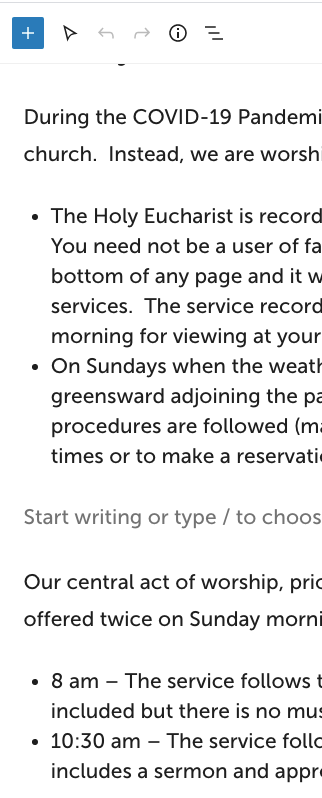
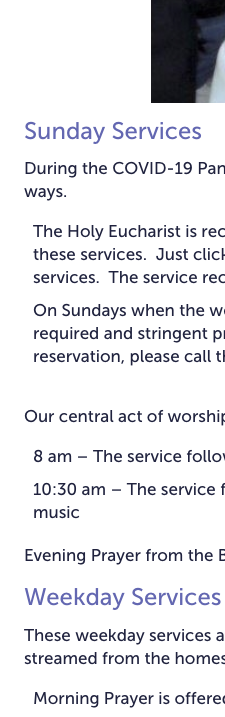
LE: See my email to you dated 12/10. the indentations are the same, which is GOOD, now we just want them both to be about 4 characters, which is what the “default” was before.
Matt: Thanks, all set. LE: Looks great. YAY!
New Items:
LE: On the Watch Service page, please put Recorded before Wednesday, November 11, 2020 under the top recording. That way it’s obvious that is not the date of the service.
MATT: completed.
LE: We were getting the date under the picture only for the banner video at the top, not on every video. We liked that. And every video had the date of the Sunday worship overlaying the picture. Can we have that? All video’s, including top, have Service date overlaying the video. Only the top video has the Recorded date underneath the picture.
MATT: I’ve switched the date format for the smaller videos from a relative date (ie. 2 weeks ago) to the actual date. The overlaying picture is selected thru Vimeo (usually at upload). If you change it there for those videos that are missing the title, WordPress should update on its next import.
LE: Looks good, thanks!
LE: Questionnaire looks good. Where does it go when I click submit?
MATT: Great! Right now the submissions are stored in the system and an email with the form information is sent to all users that are members of the Administrator role.
You can see the submissions by:
In the Dashboard, click Ninja Forms then click the “cog” icon to the right of the name of the form, then click “view submissions” ie: https://holyfamilyjasper.org/wp-admin/edit.php?post_status=all&post_type=nf_sub&form_id=2
You can change the email to use by:
- In the Dashboard, click Ninja Forms then click the name of the form to edit, ie: https://holyfamilyjasper.org/wp-admin/admin.php?page=ninja-forms&form_id=2
- Click the Emails & Actions tab (top of the page)
- Click the Admin Email row
- In the To field, replace “{wp:admin_email}” with the email to use
- Click Done then Publish
- LE: That worked great except one issue. The email I received has all the Opportunities to Service that were selected run together (Daughters of the King: Attend meetings and learn more about the order or join , Outreach: Assist with creating ways to serve in the wider community; distribute funds to charitable organizations, Pastoral Care: Provide acts of compassionate loving care to the parish for parish members and their families) PLEASE SEPARATE THEM so it’s easier to see what was selected.
- MATT: I’ve separated each into a single question.
- LE: That will work, but it isn’t ideal. “Unchecked” would be better shown as blank so the Checked items will show up.
- MATT: Thanks, all set. LE: PERFECT. Thank you!
| Alter Guild: | Checked |
| Buildings: | Unchecked |
| Christian Education: | Unchecked |
| Church Chicks: | Checked |
| Coffee Hour Host: | Unchecked |
LE: Please change the Give Now button background to #2b7722
MATT: completed. LE: Still red (#cd2653). I’ve updated on this page: https://holyfamilyjasper.org/giving-donating/ – could you link to the page(s) that are not correct?
LE: https://holyfamilyjasper.org/about-us/planning-and-giving/ is not correct.
MATT: Thanks, all set. LE: Thanks.
LE: Big Miss (Mine) – On this page Planning and Giving – Episcopal Church of the Holy Family – Jasper, Ga (sitecopilots.com) there is a link to a Pledge Card which is a pdf and should be a form, same as on the current website.
Matt: All set: https://holyfamilyjasper.org/2021-pledge-payment/
LE: Thanks for doing this so quickly. Just a few things:
- Title is 2021 Pledge Card and only put this in the title, not repeated. Done Thanks.
- Remove Required Fields and remove the asterisk at the end of the page beside “please type your name as authorization and submit.” Done Thanks.
- Put “Honoring God’s love in challenging times, I / we pledge to give of my / our financial resources to God through Holy Family Church.” at the beginning (see current website). Done Thanks.
- Put Name(s) instead of First Name, Last Name. Some couples have different last names.
- LE: Still need to change First Name, Last Name to just one line Name(s)..
- Under the Submit button (see current website) put If you would like information on including Holy Family in my will contact the church office at(770) 893-4525. Done Thanks.
Navigation tree changesWorshiping – remove Wednesday Morning Thoughts. This page will be linked from the Communications page.MATT: all set. LE: Thanks.Worshiping – add Worship Resources (a new page). We want the first content of that page to be the latest “Sermon Notes”. (Here’s hoping that’s possible.) We will put other content below that.MATT: I’ve created the page and added to the menu. There’s no way to automatically pull in the sermon notes, but you could add a link to the file through the editor.LE: Sigh… Not what we were hoping for. But, IMHO, worth it. Hope the rest of the gang agrees.Remove Getting to Know Us (page and link) under the Visiting tab.MATT: all set. LE: Thanks.
- LE: The square around the search icon overlaps Happenings and causes the search window to open when we are trying to click on Happenings.
- LE: Could we have the rector’s message (when we get it) end by running the campus video? The rector’s message will be run by clicking his picture on the home page. ALSO, is it better to put his message on vimeo or in the media library? Are we right that vimeo is for recurring videos, like worship services?